Chores done.
Then screens.
Pinky Proof keeps your kid's games and apps locked until Roo, our friendly AI kangaroo, checks that chores and homework are really done. No nagging, no arguing. Just proof.
Uses Apple's Screen Time, so the lock is the real thing.
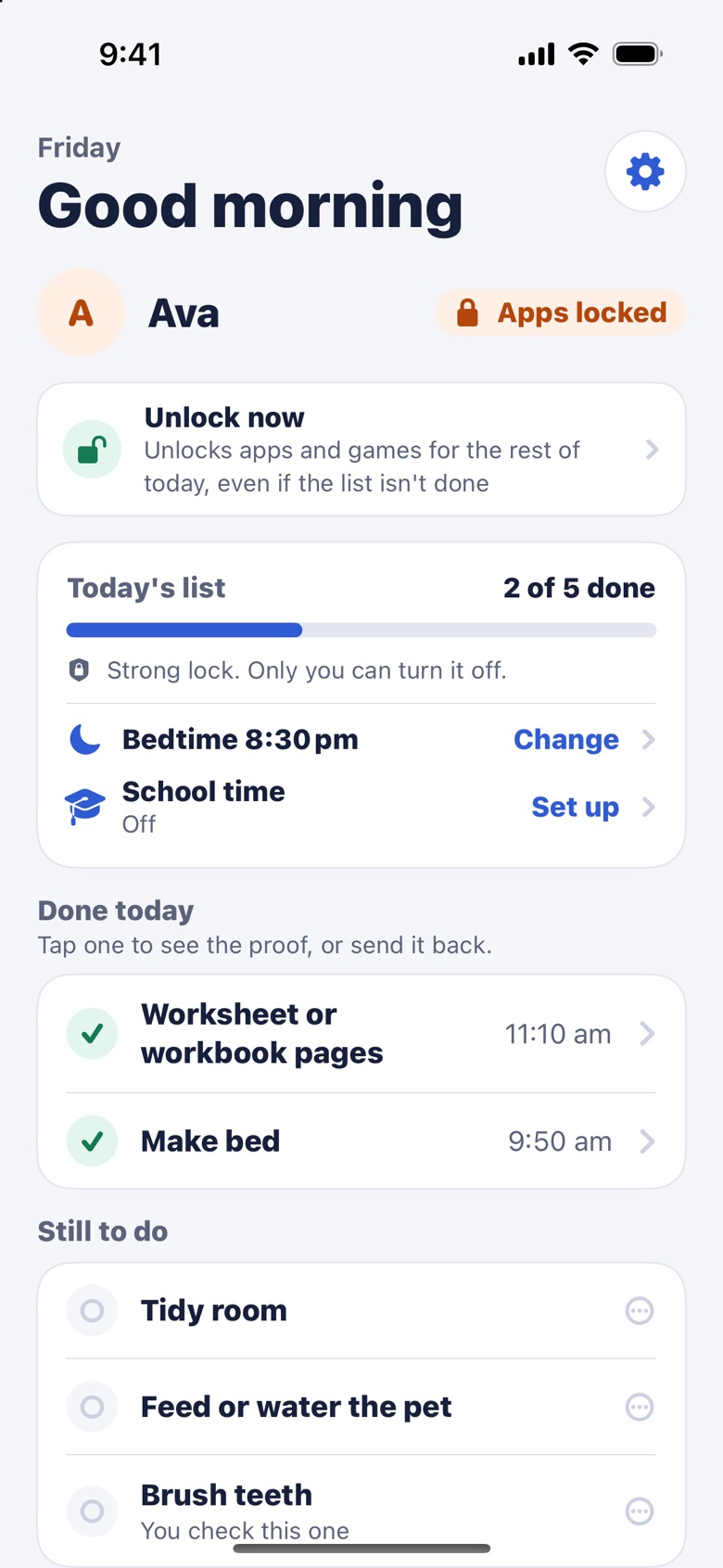
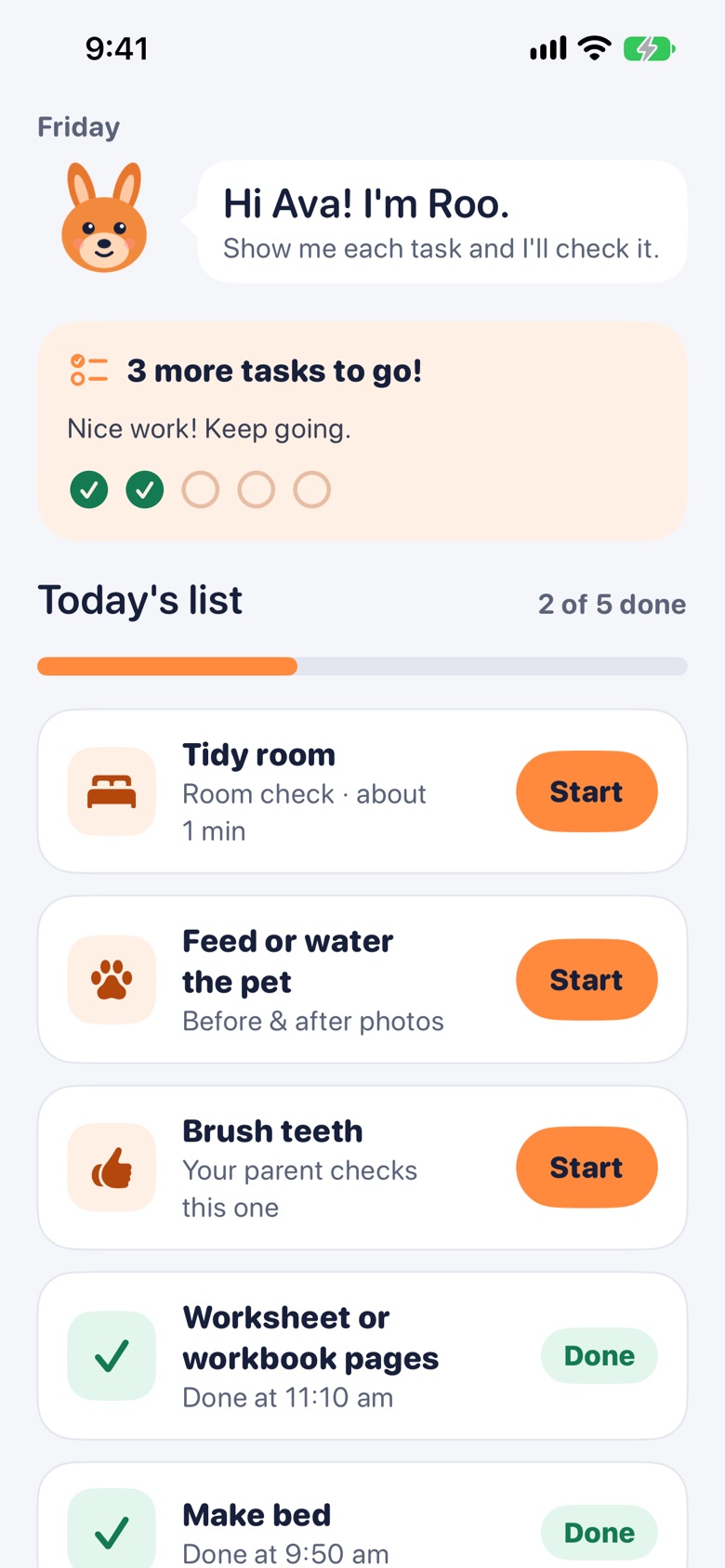
 Make bed: done! 3 more to go.
Three steps. Every day.
Set it up once. Pinky Proof locks the apps each morning, and your kid unlocks them the honest way.
Pick today's list
Make bed, feed the dog, tidy room, homework. Roo already knows what "done" looks like for each one, and matches it to your kid's age.
Your kid shows Roo
A photo, a quick walk around the room, or the homework pages, all in Pinky Proof's own camera. If something's missed, Roo kindly says what to fix.
Apps unlock
When the list is done, their apps open until bedtime. Tomorrow they lock again on their own, even if the phone is offline.
Roo checks the work, not just a checkbox.
Kids see exactly what counts before they start, so there's no guessing and no arguing about it later.
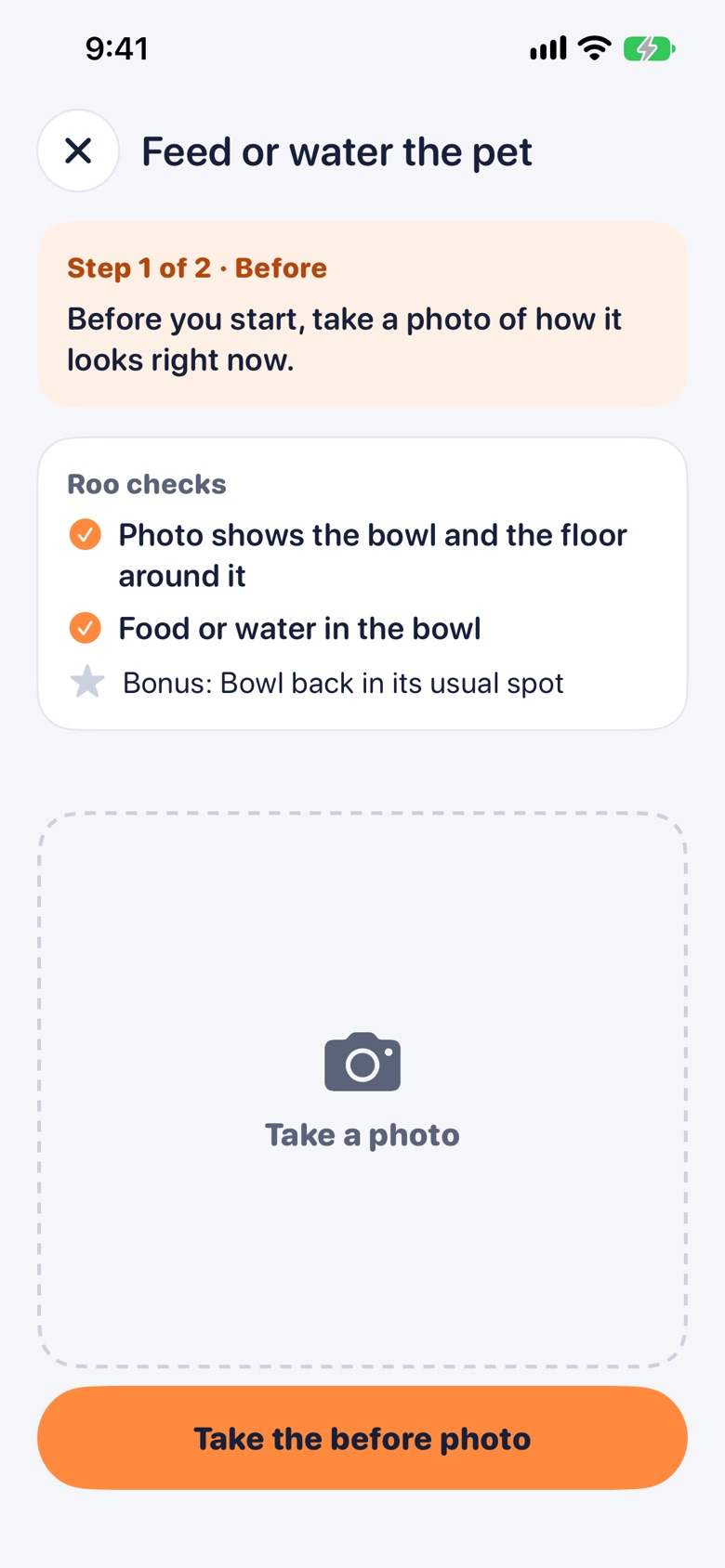
- A clear list of what Roo looks for, written for your kid's age.
- Before and after photos for chores like dishes, feeding the pet or clearing the table.
- Room checks are a walk around the room, so Roo sees the whole floor, not one tidy corner.
- Missed a spot? Roo says exactly what to fix. After three tries, it's your call.
You're in charge. Roo does the checking.
No more walking upstairs to inspect a bed. See the proof from anywhere, and step in only when you want to.
- See the proof for every finished task: the photos and Roo's checklist, line by line.
- Send it back with a note. Roo turns it into a clear goal for your kid and remembers it next time.
- Unlock now or lock now, plus bedtime and school hours for each kid.
- An alert when a kid needs you or finishes the list.
Fair for kids. Hard to fake.
Roo is built to be right, because a wrong call either lets a messy room slide or frustrates a kid who did the work.
Teach Roo your house
Add your own rules, or a photo of "done" (which bed, which sink). It's optional, and it makes Roo sharper for your family.
Homework, checked
Roo reads the worksheet, spots blank answers, and tells you if it looks like an answer key or a page on a screen.
Fair, not picky
Roo's standard fits your kid's age. A few wrinkles in the blanket are fine. Clothes on the floor are not.
Hard to fake
Only Pinky Proof's own camera, never old photos. Every check is fresh, and a photo of a screen or a picture goes to you instead.
Bedtime and school time
Apps stay locked at bedtime and during school hours. It runs on your kid's device, so it works even offline.
Both parents
Invite your partner with a code. You both see the proof and both get the alerts. Some tasks, like brushing teeth, are just "I did it" for you to confirm.
A list kids actually want to finish.
Roo cheers them on, the progress bar fills up, and the reward is the thing they already wanted: their apps.
- One list for the day, the same tasks until you change them.
- Friendly words from Roo, never a scolding.
- Phone and Pinky Proof always work, plus any app you mark as always allowed.
Built for kids' privacy from day one.
A parent says yes before anything is collected. We keep only what Roo needs to check a task, and only for as long as you need to see it.
Read the privacy policy →- Faces blurred on the phone before anything is sent
- Task photos deleted within days
- Never sold, never used for ads
- Only your kid's first name and age
- No bathroom tasks, and never filming kids
Good questions.
What ages is Pinky Proof for?
Kids from about 3 to 16 and up. You tell us your kid's age, and Roo matches what it expects and how it talks.
What do we need?
An iPhone for you, and an iPhone or iPad for your kid, both with iOS 18 or later. The strongest lock uses a child account in Apple's Family Sharing.
Can my kid just turn it off?
With a child account in Family Sharing, only a parent can turn the lock off. Without one, Pinky Proof uses a simpler lock, and you get an alert right away if it's turned off.
What if Roo gets it wrong?
You always have the last word. When Roo isn't sure, the check comes to you. You can open any finished task, see the proof and send it back, and Roo learns your house from it.
Which apps get locked?
The ones you pick, using Apple's own app picker. Phone, Pinky Proof and any app you mark as always allowed stay open. You can keep school apps open during school hours too.
Does it work without internet?
Checking a task needs internet. The lock, bedtime and the daily re-lock run on your kid's device, so they work offline.
Who checks the photos?
Roo uses AI from OpenAI, through their business service, which doesn't use our data to train its models. Faces are blurred on the phone first. See the privacy policy for the details.
How much will it cost?
Pinky Proof is free while we test it. We'll share pricing before launch, and you'll never be charged without choosing a plan.
Coming soon to the App Store.
Chores done, then screens. Pinky Proof is almost ready for families.
Download on theApp StoreQuestions? hello@pinkyproof.com